View job history and access the outputs of your custom geoprocessing jobs directly inside the QGIS and ArcGIS NIKA plugin.
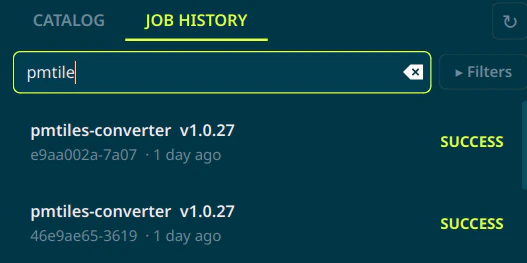
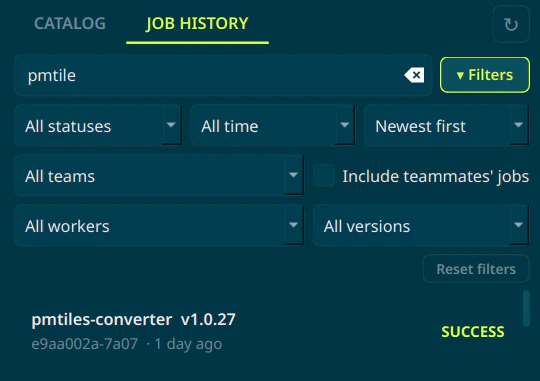
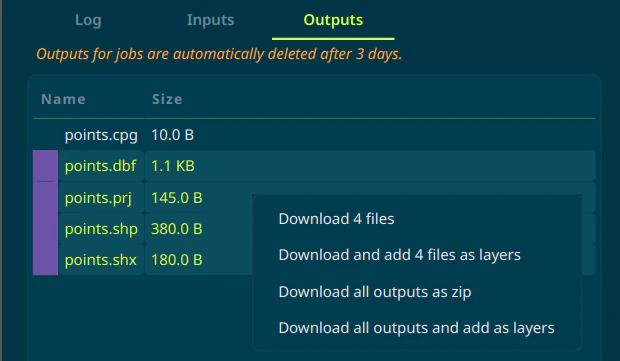
On both versions of the plugin, you can access the job history by clicking the “Job History” button in the NikaPlanet panel. The panel lets you view the history of all your jobs, both past and active.The job history panel is searchable by worker name, version, job ID.By clicking “filters”, you can fine-tune the search results to specific workers, versions, teams, or dates:If a job has outputs, you can click the “outputs” tab to view the outputs. The outputs window supports multi-select as well as downloading and adding the files as layers.
Outputs will only be available for 3 days after the job completes, so be sure to download them if you need them after that.
⌘I
{"docsConfig":{"theme":"linden","$schema":"https://mintlify.com/docs.json","name":"Nika","colors":{"primary":"#eba941","light":"#c5ff5a","dark":"#170d19"},"logo":{"light":"https://mintcdn.com/nika/iovx8mqbdwtaJS_G/images/nika-documentation-logo-light.svg?fit=max\u0026auto=format\u0026n=iovx8mqbdwtaJS_G\u0026q=85\u0026s=461d7a31ec6dbcee21be77688516ea6e","dark":"https://mintcdn.com/nika/iovx8mqbdwtaJS_G/images/nika-documentation-logo-dark.svg?fit=max\u0026auto=format\u0026n=iovx8mqbdwtaJS_G\u0026q=85\u0026s=bb868d511512b0d20a764974961fe9c8"},"favicon":"https://mintcdn.com/nika/Sf5kMtAKqa3lY-ZF/favicon.ico?fit=max\u0026auto=format\u0026n=Sf5kMtAKqa3lY-ZF\u0026q=85\u0026s=c984e1898bccea1ef65bea965afe646a","appearance":{"default":"dark"},"background":{"decoration":"windows","color":{"light":"#fefcf9","dark":"#0f100d"}},"navbar":{"links":[{"href":"https://www.nikaplanet.com/pricing","label":"Pricing"},{"href":"mailto:support@nikaplanet.com","label":"Support"},{"href":"https://www.nikaplanet.com/download","label":"Download Desktop"}],"primary":{"type":"button","label":"Planet Console","href":"https://planet.nika.eco"}},"footer":{"socials":{"x":"https://x.com/nikaplanet","github":"https://github.com/nikaplanet","linkedin":"https://linkedin.com/company/nikaplanet"},"links":[{"header":"Company","items":[{"label":"Blog","href":"https://www.nikaplanet.com/resources"},{"label":"Terms and Conditions","href":"https://www.nikaplanet.com/terms-conditions"}]}]},"seo":{"indexing":"navigable"},"fonts":{"family":"Space Grotesk"},"contextual":{"options":["copy","view","chatgpt","claude","perplexity","mcp","cursor","vscode"],"display":"header"},"styling":{"latex":false},"navigation":{"global":{"anchors":[{"anchor":"Pricing","href":"https://www.nikaplanet.com/pricing"},{"anchor":"Support","icon":"question","href":"mailto:support@nikaplanet.com"}]},"pages":[]}},"deployment":{"deploymentMetadataValue":{"subdomain":"nika","hasAudioNarration":false,"actualSubdomain":"nika","customDomains":["docs.nikaplanet.com"],"gitSource":{"type":"github","owner":"lawrencenika","repo":"nika-doc","deployBranch":"main","contentDirectory":"","isPrivate":false,"mountPath":"","label":""},"chroma":{"liveDeploymentHistoryId":"6acc6994c9710b31791697b0","collectionId":"d86d4b11-e50e-4771-8945-68022b59cb0f","schemaVersion":"v3","latestBuiltDeploymentHistoryId":"6acc6994c9710b31791697b0"},"entitlements":{},"buildId":"6acc6994c9710b31791697b0","clientVersion":"0.0.3926","searchFilterCounts":[{"language":"default","tag":"Product/Features","count":59},{"language":"default","tag":"Product Features","count":59},{"language":"default","tag":"NIKA Planet","count":50},{"language":"default","tag":"Developer Platform","count":24},{"language":"default","tag":"Developer Tools","count":24},{"language":"default","tag":"NIKA GeoEngine","count":18},{"language":"default","tag":"NikaWorkspace","count":11},{"language":"default","tag":"NikaMap","count":11},{"language":"default","tag":"Industrial Solutions","count":10},{"language":"default","tag":"NikaNotebook","count":9}]},"assistantConfig":{},"hasChatPermissions":false,"hasWebMcpPermissions":false,"toggles":[{"name":"kill-isr","enabled":true,"variant":{"name":"disabled","enabled":false,"feature_enabled":true},"impressionData":false},{"name":"agent-mintlify-slack","enabled":true,"variant":{"name":"disabled","enabled":false,"feature_enabled":true},"impressionData":false},{"name":"editor-v7-file-tree","enabled":true,"variant":{"name":"disabled","enabled":false,"feature_enabled":true},"impressionData":false},{"name":"agent-integrations-settings","enabled":true,"variant":{"name":"disabled","enabled":false,"feature_enabled":true},"impressionData":false},{"name":"automations-pr-grouping","enabled":true,"variant":{"name":"disabled","enabled":false,"feature_enabled":true},"impressionData":false},{"name":"custom-prefix","enabled":true,"variant":{"name":"disabled","enabled":false,"feature_enabled":true},"impressionData":false},{"name":"analytics-v7","enabled":true,"variant":{"name":"disabled","enabled":false,"feature_enabled":true},"impressionData":false},{"name":"user-flows-analytics","enabled":true,"variant":{"name":"disabled","enabled":false,"feature_enabled":true},"impressionData":false},{"name":"no-publish-flow","enabled":true,"variant":{"name":"disabled","enabled":false,"feature_enabled":true},"impressionData":false},{"name":"workos-onboarding","enabled":true,"variant":{"name":"disabled","enabled":false,"feature_enabled":true},"impressionData":false},{"name":"llms-txt-v2","enabled":true,"variant":{"name":"disabled","enabled":false,"feature_enabled":true},"impressionData":false},{"name":"pause-universal-search-reconcile","enabled":true,"variant":{"name":"disabled","enabled":false,"feature_enabled":true},"impressionData":false},{"name":"snapshot-serving-live","enabled":true,"variant":{"name":"disabled","enabled":false,"feature_enabled":true},"impressionData":false},{"name":"stripTemperatureMiddleware","enabled":true,"variant":{"name":"disabled","enabled":false,"feature_enabled":true},"impressionData":false},{"name":"per-site-search-delta","enabled":true,"variant":{"name":"disabled","enabled":false,"feature_enabled":true},"impressionData":false},{"name":"support-platform-pylon-zendesk","enabled":true,"variant":{"name":"disabled","enabled":false,"feature_enabled":true},"impressionData":false},{"name":"snapshot-serving","enabled":true,"variant":{"name":"disabled","enabled":false,"feature_enabled":true},"impressionData":false},{"name":"instant-rollback","enabled":true,"variant":{"name":"disabled","enabled":false,"feature_enabled":true},"impressionData":false},{"name":"granular-notifications-server","enabled":true,"variant":{"name":"disabled","enabled":false,"feature_enabled":true},"impressionData":false},{"name":"granular-notifications","enabled":true,"variant":{"name":"disabled","enabled":false,"feature_enabled":true},"impressionData":false},{"name":"editor-private-page-search","enabled":true,"variant":{"name":"disabled","enabled":false,"feature_enabled":true},"impressionData":false},{"name":"automations-fable","enabled":true,"variant":{"name":"disabled","enabled":false,"feature_enabled":true},"impressionData":false},{"name":"fixed-ai-action-pricing","enabled":true,"variant":{"name":"disabled","enabled":false,"feature_enabled":true},"impressionData":false},{"name":"automation-resolve-merge-conflict","enabled":true,"variant":{"name":"disabled","enabled":false,"feature_enabled":true},"impressionData":false},{"name":"scoped-publishing","enabled":true,"variant":{"name":"disabled","enabled":false,"feature_enabled":true},"impressionData":false},{"name":"mintql","enabled":true,"variant":{"name":"disabled","enabled":false,"feature_enabled":true},"impressionData":false},{"name":"page-level-analytics","enabled":true,"variant":{"name":"disabled","enabled":false,"feature_enabled":true},"impressionData":false},{"name":"editor-version-history-v2","enabled":true,"variant":{"name":"disabled","enabled":false,"feature_enabled":true},"impressionData":false},{"name":"editor-nav-generations","enabled":true,"variant":{"name":"disabled","enabled":false,"feature_enabled":true},"impressionData":false},{"name":"billing-page-v2","enabled":true,"variant":{"name":"disabled","enabled":false,"feature_enabled":true},"impressionData":false},{"name":"vite-origin","enabled":true,"variant":{"name":"disabled","enabled":false,"feature_enabled":true},"impressionData":false},{"name":"workspace-projects","enabled":true,"variant":{"name":"disabled","enabled":false,"feature_enabled":true},"impressionData":false},{"name":"assistant-v5","enabled":true,"variant":{"name":"disabled","enabled":false,"feature_enabled":true},"impressionData":false},{"name":"byok-sep-25","enabled":true,"variant":{"name":"disabled","enabled":false,"feature_enabled":true},"impressionData":false},{"name":"fork-pr-previews","enabled":true,"variant":{"name":"disabled","enabled":false,"feature_enabled":true},"impressionData":false},{"name":"revalidation-jwt","enabled":true,"variant":{"name":"disabled","enabled":false,"feature_enabled":true},"impressionData":false},{"name":"editor-agent-model-picker","enabled":true,"variant":{"name":"disabled","enabled":false,"feature_enabled":true},"impressionData":false},{"name":"hobby-abuse-scan","enabled":true,"variant":{"name":"disabled","enabled":false,"feature_enabled":true},"impressionData":false},{"name":"dashboard-inbox","enabled":true,"variant":{"name":"disabled","enabled":false,"feature_enabled":true},"impressionData":false}],"isAtlas":false,"googleFontsInlined":true},"customCss":[],"page":{"pagePath":"guides/custom-geoprocess-usage/access-job-outputs","slug":"/guides/custom-geoprocess-usage/access-job-outputs","pageMetadata":{"title":"Access Job Outputs","description":"View job history and access the outputs of your custom geoprocessing jobs directly inside the QGIS and ArcGIS NIKA plugin.","href":"/guides/custom-geoprocess-usage/access-job-outputs"},"description":{"compiledSource":"\"use strict\";\nconst {jsx: _jsx} = arguments[0];\nconst {useMDXComponents: _provideComponents} = arguments[0];\nfunction _createMdxContent(props) {\n const _components = {\n p: \"p\",\n ..._provideComponents(),\n ...props.components\n };\n return _jsx(_components.p, {\n children: \"View job history and access the outputs of your custom geoprocessing jobs directly inside the QGIS and ArcGIS NIKA plugin.\"\n });\n}\nfunction MDXContent(props = {}) {\n const {wrapper: MDXLayout} = {\n ..._provideComponents(),\n ...props.components\n };\n return MDXLayout ? _jsx(MDXLayout, {\n ...props,\n children: _jsx(_createMdxContent, {\n ...props\n })\n }) : _createMdxContent(props);\n}\nreturn {\n default: MDXContent\n};\n","frontmatter":{},"scope":{}},"pageType":"default","mdx":{"mdxSource":{"compiledSource":"\"use strict\";const{Fragment:_Fragment,jsx:_jsx,jsxs:_jsxs}=arguments[0];const{useMDXComponents:_provideComponents}=arguments[0];function _createMdxContent(props){const _components={p:`p`,..._provideComponents(),...props.components},{OptimizedImage,Warning}=_components;if(!OptimizedImage)_missingMdxReference(`OptimizedImage`,true);if(!Warning)_missingMdxReference(`Warning`,true);return _jsxs(_Fragment,{children:[_jsx(_components.p,{children:`On both versions of the plugin, you can access the job history by clicking the “Job History” button in the NikaPlanet panel. The panel lets you view the history of all your jobs, both past and active.`}),`\n`,_jsx(_components.p,{children:`The job history panel is searchable by worker name, version, job ID.`}),`\n`,_jsx(OptimizedImage,{src:`https://mintcdn.com/nika/vcubVM1LUXLzgNLA/guides/custom-geoprocess-usage/qgis-searchfilter.png?fit=max\u0026auto=format\u0026n=vcubVM1LUXLzgNLA\u0026q=85\u0026s=290ad4cc436ebca0553172d3ce1625b4`,alt:`QGIS Job History`,\"data-og-width\":`527`,width:`527`,\"data-og-height\":`263`,height:`263`,\"data-path\":`guides/custom-geoprocess-usage/qgis-searchfilter.png`,\"data-optimize\":`true`,\"data-opv\":`3`,srcset:`https://mintcdn.com/nika/vcubVM1LUXLzgNLA/guides/custom-geoprocess-usage/qgis-searchfilter.png?w=280\u0026fit=max\u0026auto=format\u0026n=vcubVM1LUXLzgNLA\u0026q=85\u0026s=ea4b8f7694735607eab74384ea78f2ca 280w, https://mintcdn.com/nika/vcubVM1LUXLzgNLA/guides/custom-geoprocess-usage/qgis-searchfilter.png?w=560\u0026fit=max\u0026auto=format\u0026n=vcubVM1LUXLzgNLA\u0026q=85\u0026s=c407981511c9b1258809aa6d224669eb 560w, https://mintcdn.com/nika/vcubVM1LUXLzgNLA/guides/custom-geoprocess-usage/qgis-searchfilter.png?w=840\u0026fit=max\u0026auto=format\u0026n=vcubVM1LUXLzgNLA\u0026q=85\u0026s=bae3c3f66a841c93e02a884e9b0a11a4 840w, https://mintcdn.com/nika/vcubVM1LUXLzgNLA/guides/custom-geoprocess-usage/qgis-searchfilter.png?w=1100\u0026fit=max\u0026auto=format\u0026n=vcubVM1LUXLzgNLA\u0026q=85\u0026s=3c04e4a87cd4cdb9be00f07ea8d34a5b 1100w, https://mintcdn.com/nika/vcubVM1LUXLzgNLA/guides/custom-geoprocess-usage/qgis-searchfilter.png?w=1650\u0026fit=max\u0026auto=format\u0026n=vcubVM1LUXLzgNLA\u0026q=85\u0026s=48142e605cd6c82f2da36e34a6883be6 1650w, https://mintcdn.com/nika/vcubVM1LUXLzgNLA/guides/custom-geoprocess-usage/qgis-searchfilter.png?w=2500\u0026fit=max\u0026auto=format\u0026n=vcubVM1LUXLzgNLA\u0026q=85\u0026s=961699a8ea2c5d049dc42e87383a92a2 2500w`}),`\n`,_jsx(_components.p,{children:`By clicking “filters”, you can fine-tune the search results to specific workers, versions, teams, or dates:`}),`\n`,_jsx(OptimizedImage,{src:`https://mintcdn.com/nika/vcubVM1LUXLzgNLA/guides/custom-geoprocess-usage/qgis-filters.png?fit=max\u0026auto=format\u0026n=vcubVM1LUXLzgNLA\u0026q=85\u0026s=251fc2a7bee101a995c045f25668a0e5`,alt:`QGIS Filters`,\"data-og-width\":`540`,width:`540`,\"data-og-height\":`381`,height:`381`,\"data-path\":`guides/custom-geoprocess-usage/qgis-filters.png`,\"data-optimize\":`true`,\"data-opv\":`3`,srcset:`https://mintcdn.com/nika/vcubVM1LUXLzgNLA/guides/custom-geoprocess-usage/qgis-filters.png?w=280\u0026fit=max\u0026auto=format\u0026n=vcubVM1LUXLzgNLA\u0026q=85\u0026s=cd86e227326a24e6cfcc0f5cc3a803f2 280w, https://mintcdn.com/nika/vcubVM1LUXLzgNLA/guides/custom-geoprocess-usage/qgis-filters.png?w=560\u0026fit=max\u0026auto=format\u0026n=vcubVM1LUXLzgNLA\u0026q=85\u0026s=23c8367b542d5605fa9c7a8bdd3b1143 560w, https://mintcdn.com/nika/vcubVM1LUXLzgNLA/guides/custom-geoprocess-usage/qgis-filters.png?w=840\u0026fit=max\u0026auto=format\u0026n=vcubVM1LUXLzgNLA\u0026q=85\u0026s=da83313a98f737825b4022a872bab7e3 840w, https://mintcdn.com/nika/vcubVM1LUXLzgNLA/guides/custom-geoprocess-usage/qgis-filters.png?w=1100\u0026fit=max\u0026auto=format\u0026n=vcubVM1LUXLzgNLA\u0026q=85\u0026s=4997c4825cd4e137d2c91021828db679 1100w, https://mintcdn.com/nika/vcubVM1LUXLzgNLA/guides/custom-geoprocess-usage/qgis-filters.png?w=1650\u0026fit=max\u0026auto=format\u0026n=vcubVM1LUXLzgNLA\u0026q=85\u0026s=0e4e61220adcf8aa3dc253ef2e8d9049 1650w, https://mintcdn.com/nika/vcubVM1LUXLzgNLA/guides/custom-geoprocess-usage/qgis-filters.png?w=2500\u0026fit=max\u0026auto=format\u0026n=vcubVM1LUXLzgNLA\u0026q=85\u0026s=ec570e404be8840be3f6710080c4caf6 2500w`}),`\n`,_jsx(_components.p,{children:`If a job has outputs, you can click the “outputs” tab to view the outputs. The outputs window supports multi-select as well as downloading and adding the files as layers.`}),`\n`,_jsx(OptimizedImage,{src:`https://mintcdn.com/nika/vcubVM1LUXLzgNLA/guides/custom-geoprocess-usage/qgis-outputselect.png?fit=max\u0026auto=format\u0026n=vcubVM1LUXLzgNLA\u0026q=85\u0026s=000d00875fbf2a30fdf79206a60de95b`,alt:`QGIS Outputs`,\"data-og-width\":`620`,width:`620`,\"data-og-height\":`361`,height:`361`,\"data-path\":`guides/custom-geoprocess-usage/qgis-outputselect.png`,\"data-optimize\":`true`,\"data-opv\":`3`,srcset:`https://mintcdn.com/nika/vcubVM1LUXLzgNLA/guides/custom-geoprocess-usage/qgis-outputselect.png?w=280\u0026fit=max\u0026auto=format\u0026n=vcubVM1LUXLzgNLA\u0026q=85\u0026s=bd39f1f1a82dbb32956e8fbb5756f71d 280w, https://mintcdn.com/nika/vcubVM1LUXLzgNLA/guides/custom-geoprocess-usage/qgis-outputselect.png?w=560\u0026fit=max\u0026auto=format\u0026n=vcubVM1LUXLzgNLA\u0026q=85\u0026s=0b7fcfeda51c62e5328db2e66ee22529 560w, https://mintcdn.com/nika/vcubVM1LUXLzgNLA/guides/custom-geoprocess-usage/qgis-outputselect.png?w=840\u0026fit=max\u0026auto=format\u0026n=vcubVM1LUXLzgNLA\u0026q=85\u0026s=b17228d67d2f60ffd629b5cbf6f14f08 840w, https://mintcdn.com/nika/vcubVM1LUXLzgNLA/guides/custom-geoprocess-usage/qgis-outputselect.png?w=1100\u0026fit=max\u0026auto=format\u0026n=vcubVM1LUXLzgNLA\u0026q=85\u0026s=a336771f9c36f2bd812254250cabd60b 1100w, https://mintcdn.com/nika/vcubVM1LUXLzgNLA/guides/custom-geoprocess-usage/qgis-outputselect.png?w=1650\u0026fit=max\u0026auto=format\u0026n=vcubVM1LUXLzgNLA\u0026q=85\u0026s=d29a81923436b364c8d331dafa4313fe 1650w, https://mintcdn.com/nika/vcubVM1LUXLzgNLA/guides/custom-geoprocess-usage/qgis-outputselect.png?w=2500\u0026fit=max\u0026auto=format\u0026n=vcubVM1LUXLzgNLA\u0026q=85\u0026s=b5195f30dbbf7e901113ca2d9d7f6438 2500w`}),`\n`,_jsx(Warning,{children:_jsx(_components.p,{children:`Outputs will only be available for 3 days after the job completes, so be sure to download them if you need them after that.`})})]})}function MDXContent(props={}){const{wrapper:MDXLayout}={..._provideComponents(),...props.components};return MDXLayout?_jsx(MDXLayout,{...props,children:_jsx(_createMdxContent,{...props})}):_createMdxContent(props)}return{default:MDXContent};function _missingMdxReference(id,component){throw new Error(`Expected `+(component?`component`:`object`)+\" `\"+id+\"` to be defined: you likely forgot to import, pass, or provide it.\")}","frontmatter":{},"scope":{"config":{},"pageMetadata":{"title":"Access Job Outputs","description":"View job history and access the outputs of your custom geoprocessing jobs directly inside the QGIS and ArcGIS NIKA plugin.","href":"/guides/custom-geoprocess-usage/access-job-outputs"}}},"mdxSourceWithNoJs":null},"mdxExtracts":{"tableOfContents":[],"codeExamples":{}},"jsLinks":["/_mintlify/custom/nika/8129945477164018/floating-cta.js","/_mintlify/custom/nika/fdc79a95262be4a8/platform-detect.js","/_mintlify/custom/nika/47ada1a5ef57fc0d/nika-background-theme.js","/_mintlify/custom/nika/dd388fe82517b4bf/topbar-actions.js","/_mintlify/custom/nika/e39093d8998e47f3/memory-core-chat-theme.js"],"subdomain":"nika","siteName":"Nika","title":"Access Job Outputs - Nika","navMaps":{"firstHrefInVersion":{},"firstHrefInLanguage":{}},"lastModified":"2026-06-16T03:08:57.895Z","originalFileLocation":"guides/custom-geoprocess-usage/access-job-outputs.mdx"},"headHtml":"\u003cscript data-mint-head>(function(){var d=document.documentElement,p=null;if(!p){try{p=localStorage.getItem(\"isDarkMode\")}catch(e){}if(p==='true')p='dark';else if(p==='false')p='light';if(p!=='light'\u0026\u0026p!=='dark'\u0026\u0026p!=='system')p=\"dark\"}var r=p==='system'?(matchMedia(\"(prefers-color-scheme: dark)\").matches?'dark':'light'):p;d.classList.remove(r==='dark'?'light':'dark');d.classList.add(r);d.setAttribute(\"data-theme-preference\",p)})();\u003c/script>\u003cmeta data-mint-head name=\"description\" content=\"View job history and access the outputs of your custom geoprocessing jobs directly inside the QGIS and ArcGIS NIKA plugin.\">\u003cmeta data-mint-head name=\"application-name\" content=\"Nika\">\u003cmeta data-mint-head name=\"generator\" content=\"Mintlify\">\u003clink data-mint-head rel=\"icon\" type=\"image/png\" sizes=\"192x192\" href=\"/mintlify-assets/_mintlify/favicons/nika/ZdVuE3w5PrQQ4Fjr/_generated/favicon/android-chrome-192x192.png\" media=\"(prefers-color-scheme: light)\">\u003clink data-mint-head rel=\"apple-touch-icon\" type=\"image/png\" sizes=\"180x180\" href=\"/mintlify-assets/_mintlify/favicons/nika/ZdVuE3w5PrQQ4Fjr/_generated/favicon/apple-touch-icon.png\">\u003clink data-mint-head rel=\"icon\" type=\"image/png\" sizes=\"16x16\" href=\"/mintlify-assets/_mintlify/favicons/nika/ZdVuE3w5PrQQ4Fjr/_generated/favicon/favicon-16x16.png\" media=\"(prefers-color-scheme: light)\">\u003clink data-mint-head rel=\"icon\" type=\"image/png\" sizes=\"32x32\" href=\"/mintlify-assets/_mintlify/favicons/nika/ZdVuE3w5PrQQ4Fjr/_generated/favicon/favicon-32x32.png\" media=\"(prefers-color-scheme: light)\">\u003clink data-mint-head rel=\"shortcut icon\" type=\"image/x-icon\" href=\"/mintlify-assets/_mintlify/favicons/nika/ZdVuE3w5PrQQ4Fjr/_generated/favicon/favicon.ico\" media=\"(prefers-color-scheme: light)\">\u003clink data-mint-head rel=\"icon\" type=\"image/png\" sizes=\"192x192\" href=\"/mintlify-assets/_mintlify/favicons/nika/ZdVuE3w5PrQQ4Fjr/_generated/favicon-dark/android-chrome-192x192.png\" media=\"(prefers-color-scheme: dark)\">\u003clink data-mint-head rel=\"icon\" type=\"image/png\" sizes=\"16x16\" href=\"/mintlify-assets/_mintlify/favicons/nika/ZdVuE3w5PrQQ4Fjr/_generated/favicon-dark/favicon-16x16.png\" media=\"(prefers-color-scheme: dark)\">\u003clink data-mint-head rel=\"icon\" type=\"image/png\" sizes=\"32x32\" href=\"/mintlify-assets/_mintlify/favicons/nika/ZdVuE3w5PrQQ4Fjr/_generated/favicon-dark/favicon-32x32.png\" media=\"(prefers-color-scheme: dark)\">\u003clink data-mint-head rel=\"shortcut icon\" type=\"image/x-icon\" href=\"/mintlify-assets/_mintlify/favicons/nika/ZdVuE3w5PrQQ4Fjr/_generated/favicon-dark/favicon.ico\" media=\"(prefers-color-scheme: dark)\">\u003cmeta data-mint-head property=\"og:title\" content=\"Access Job Outputs - Nika\">\u003cmeta data-mint-head property=\"og:description\" content=\"View job history and access the outputs of your custom geoprocessing jobs directly inside the QGIS and ArcGIS NIKA plugin.\">\u003cmeta data-mint-head property=\"og:site_name\" content=\"Nika\">\u003cmeta data-mint-head property=\"og:url\" content=\"https://docs.nikaplanet.com/guides/custom-geoprocess-usage/access-job-outputs\">\u003cmeta data-mint-head property=\"og:type\" content=\"website\">\u003cmeta data-mint-head property=\"og:image\" content=\"https://nika.mintlify.app/_mintlify/api/og/v2?division=Run+in+GIS\u0026amp;title=Access+Job+Outputs\u0026amp;description=View+job+history+and+access+the+outputs+of+your+custom+geoprocessing+jobs+directly+inside+the+QGIS+and+ArcGIS+NIKA+plugin.\u0026amp;theme=a5564fdcc14ec0fde08c705c\u0026amp;signature=d384d6c7e5339af4267e34ed30140342bcee72180cdfa5607bd31c093ea80bbd\">\u003cmeta data-mint-head property=\"og:image:width\" content=\"1200\">\u003cmeta data-mint-head property=\"og:image:height\" content=\"630\">\u003cmeta data-mint-head name=\"twitter:card\" content=\"summary_large_image\">\u003cmeta data-mint-head name=\"twitter:title\" content=\"Access Job Outputs - Nika\">\u003cmeta data-mint-head name=\"twitter:description\" content=\"View job history and access the outputs of your custom geoprocessing jobs directly inside the QGIS and ArcGIS NIKA plugin.\">\u003cmeta data-mint-head name=\"twitter:image\" content=\"https://nika.mintlify.app/_mintlify/api/og/v2?division=Run+in+GIS\u0026amp;title=Access+Job+Outputs\u0026amp;description=View+job+history+and+access+the+outputs+of+your+custom+geoprocessing+jobs+directly+inside+the+QGIS+and+ArcGIS+NIKA+plugin.\u0026amp;theme=a5564fdcc14ec0fde08c705c\u0026amp;signature=d384d6c7e5339af4267e34ed30140342bcee72180cdfa5607bd31c093ea80bbd\">\u003cmeta data-mint-head name=\"twitter:image:width\" content=\"1200\">\u003cmeta data-mint-head name=\"twitter:image:height\" content=\"630\">\u003cmeta data-mint-head name=\"msapplication-config\" content=\"/mintlify-assets/_mintlify/favicons/nika/ZdVuE3w5PrQQ4Fjr/_generated/favicon/browserconfig.xml\">\u003cmeta data-mint-head name=\"apple-mobile-web-app-title\" content=\"Nika\">\u003cmeta data-mint-head name=\"msapplication-TileColor\" content=\"#eba941\">\u003clink data-mint-head rel=\"canonical\" href=\"https://docs.nikaplanet.com/guides/custom-geoprocess-usage/access-job-outputs\">\u003clink data-mint-head rel=\"alternate\" type=\"application/xml\" href=\"/sitemap.xml\">\u003clink data-mint-head rel=\"alternate\" type=\"text/markdown\" href=\"/guides/custom-geoprocess-usage/access-job-outputs.md\">\u003cscript data-mint-head type=\"application/ld+json\">{\"@context\":\"https://schema.org\",\"@graph\":[{\"@type\":\"Organization\",\"@id\":\"https://docs.nikaplanet.com/#organization\",\"name\":\"Nika\",\"url\":\"https://docs.nikaplanet.com\",\"logo\":{\"@type\":\"ImageObject\",\"url\":\"https://mintcdn.com/nika/iovx8mqbdwtaJS_G/images/nika-documentation-logo-light.svg?fit=max\u0026auto=format\u0026n=iovx8mqbdwtaJS_G\u0026q=85\u0026s=461d7a31ec6dbcee21be77688516ea6e\"}},{\"@type\":\"WebSite\",\"@id\":\"https://docs.nikaplanet.com#website\",\"name\":\"Nika\",\"url\":\"https://docs.nikaplanet.com\",\"publisher\":{\"@id\":\"https://docs.nikaplanet.com/#organization\"}},{\"@type\":\"WebPage\",\"@id\":\"https://docs.nikaplanet.com/guides/custom-geoprocess-usage/access-job-outputs#webpage\",\"url\":\"https://docs.nikaplanet.com/guides/custom-geoprocess-usage/access-job-outputs\",\"name\":\"Access Job Outputs\",\"description\":\"View job history and access the outputs of your custom geoprocessing jobs directly inside the QGIS and ArcGIS NIKA plugin.\",\"dateModified\":\"2026-06-16T03:08:57.895Z\",\"isPartOf\":{\"@id\":\"https://docs.nikaplanet.com#website\"},\"breadcrumb\":{\"@id\":\"https://docs.nikaplanet.com/guides/custom-geoprocess-usage/access-job-outputs#breadcrumb\"}},{\"@type\":\"BreadcrumbList\",\"@id\":\"https://docs.nikaplanet.com/guides/custom-geoprocess-usage/access-job-outputs#breadcrumb\",\"itemListElement\":[{\"@type\":\"ListItem\",\"position\":1,\"name\":\"NIKA GeoEngine\",\"item\":\"https://docs.nikaplanet.com/nika-geoengine/overview\"},{\"@type\":\"ListItem\",\"position\":2,\"name\":\"Run in GIS\",\"item\":\"https://docs.nikaplanet.com/guides/custom-geoprocess-deployment/running-in-gis\"},{\"@type\":\"ListItem\",\"position\":3,\"name\":\"Access Job Outputs\",\"item\":\"https://docs.nikaplanet.com/guides/custom-geoprocess-usage/access-job-outputs\"}]},{\"@type\":[\"Article\",\"TechArticle\"],\"@id\":\"https://docs.nikaplanet.com/guides/custom-geoprocess-usage/access-job-outputs#article\",\"headline\":\"Access Job Outputs\",\"name\":\"Access Job Outputs\",\"description\":\"View job history and access the outputs of your custom geoprocessing jobs directly inside the QGIS and ArcGIS NIKA plugin.\",\"url\":\"https://docs.nikaplanet.com/guides/custom-geoprocess-usage/access-job-outputs\",\"mainEntityOfPage\":{\"@id\":\"https://docs.nikaplanet.com/guides/custom-geoprocess-usage/access-job-outputs#webpage\"},\"dateModified\":\"2026-06-16T03:08:57.895Z\",\"publisher\":{\"@id\":\"https://docs.nikaplanet.com/#organization\"},\"isPartOf\":{\"@id\":\"https://docs.nikaplanet.com#website\"}}]}\u003c/script>\u003cscript data-mint-head type=\"application/ld+json\">{\"@context\":\"https://schema.org\",\"@type\":\"WebSite\",\"name\":\"Nika\",\"creator\":{\"@type\":\"Organization\",\"name\":\"Mintlify\",\"url\":\"https://mintlify.com\"}}\u003c/script>","siteName":"Nika","nav":{"global":{"anchors":[{"anchor":"Pricing","href":"https://www.nikaplanet.com/pricing"},{"anchor":"Support","icon":"question","href":"mailto:support@nikaplanet.com"}]},"tabs":[{"tab":"Product/Features","pages":[{"title":"Product/Features","href":"/nika-desktop/overview"}]},{"tab":"Developer Platform","anchors":[{"anchor":"Welcome","icon":"house","href":"/developer-platform/overview"},{"anchor":"Developer Tools","groups":[{"group":"OnlyMap JS","icon":"map","pages":[{"title":"Overview","icon":"map","href":"/onlymap/overview"},{"title":"Authoring Model","icon":"code","href":"/onlymap/authoring"},{"title":"Cartographs \u0026 Atlases","icon":"print","href":"/onlymap/cartographs"},{"title":"React Native","icon":"mobile","href":"/onlymap/react-native"},{"title":"Remotion","icon":"clapperboard","href":"/onlymap/remotion"},{"title":"Licensing \u0026 Telemetry","icon":"scale-balanced","href":"/onlymap/licensing-and-telemetry"}]},{"group":"NIKA GeoEngine","icon":"cube","pages":[{"title":"Overview","href":"/nika-geoengine/overview"},{"group":"Start Here","pages":[{"title":"Installation \u0026 Setup","href":"/guides/custom-geoprocess-deployment/installation"},{"title":"Your First Worker: Step-by-Step","href":"/guides/custom-geoprocess-deployment/step-by-step"},{"title":"Your Second Worker: AI-assisted","href":"/guides/custom-geoprocess-deployment/ai-coder-worker"}]},{"group":"Build \u0026 Release","pages":[{"title":"Designing Worker Tests","href":"/guides/custom-geoprocess-deployment/test-designing"},{"title":"Version Workers","href":"/guides/custom-geoprocess-deployment/versioning"},{"title":"Cloud Push","href":"/guides/custom-geoprocess-deployment/cloud-push"},{"title":"Collaborate on Workers","href":"/guides/custom-geoprocess-deployment/worker-collaboration"}]},{"group":"Run in GIS","pages":[{"title":"Run Workers in ArcGIS Pro or QGIS","href":"/guides/custom-geoprocess-deployment/running-in-gis"},{"title":"Setup the Plugin in GIS","href":"/guides/custom-geoprocess-usage/setup-plugin-in-gis"},{"title":"Submit a Job","description":"Submit a custom geoprocessing job to a deployed NIKA worker from QGIS or ArcGIS, and track its progress from the plugin.","href":"/guides/custom-geoprocess-usage/submitting-a-job"},{"title":"Access Job Outputs","href":"/guides/custom-geoprocess-usage/access-job-outputs"},{"title":"Use with QGIS","description":"Integrate NikaGeoEngine and NikaPlanet cloud services natively into QGIS","icon":"plug","href":"/nika-geoengine/qgis"},{"title":"Use with ArcGIS Pro","icon":"plug","href":"/nika-geoengine/arcgis"}]},{"group":"Maintain \u0026 Reference","pages":[{"title":"Debug \u0026 Troubleshoot","href":"/guides/custom-geoprocess-deployment/debugging"},{"title":"Maintain GeoEngine Files","href":"/guides/custom-geoprocess-deployment/maintenance"},{"title":"CLI Reference","href":"/guides/custom-geoprocess-deployment/cli-reference"},{"title":"NIKA GeoEngine Releases","href":"/nika-geoengine/releases"}]}]}]}]},{"tab":"Industrial Solutions","pages":[{"title":"Industrial Solutions","href":"/industrial-solutions/river-ecology-stress-hotspot"}]}]},"title":"Access Job Outputs - Nika","buildId":"dpl_9DauxEjb9gzCtcuhPQFbquJvx7FJ","deploymentId":"dpl_9DauxEjb9gzCtcuhPQFbquJvx7FJ","dynamics":["a74be98ba7"],"chunks":["zoom-image-lightbox-D4WcYaf4.js","PlusIcon-CwhPVjTe.js","lightbox-handle-r17bVUz3.js"]}