

Overview
NIKA Memory Core turns years of accumulated specialised knowledge into a queryable, spatially-aware knowledge base — the enterprise brain that remembers everything your organization has ever learned about the places it works. Ingest your documents and NIKA builds a knowledge layer that understands what your organization knows and where it applies geographically. Any team member — from a new graduate to a project director — can ask questions in plain language and get answers grounded in your organization’s own data.Example Queries
- Environmental
- Infrastructure & Engineering
- Natural Resources
- Government & Public Sector
Have we done any Phase 1 habitat surveys within 2km of this site?

Phase 1 Habitat Surveys are used to identify habitats that may support protected species. To find out if your organization has previously surveyed a site, you would need to check your internal project records or document management system. Local ecological data may also be available through Natural England or your local records centre.
That’s not what I’m asking — I need to know if WE have already surveyed this specific location, not general advice on where to search.
N
NIKAMemory CoreYes — 3 Phase 1 surveys from your archive cover this area. The most recent was March 2022 for the Thornfield Solar Project (ref: TS-2022-HAB-01). Two species of concern were flagged: marsh harrier nesting habitat and great crested newt receptor zones. Sources: TS-2022-HAB-01 p.14, BW-2019-EC-07 p.6
Can you show me where we’ve recorded great crested newts in the Thornfield area and map the survey points?
Great crested newts (Triturus cristatus) are a European Protected Species typically surveyed using torch, bottle-trap, and eDNA methods. To map your records, you would need to export survey coordinates from your ecology database into a GIS tool such as ArcGIS or QGIS, then visualise the points against a base map.
I don’t need a GIS tutorial — I need to see where OUR team has actually found them, mapped right now from our own survey files.
N
NIKAMemory Core4 GCN records in your Thornfield archive: 2 confirmed breeding ponds (Pond A: SU456214, Pond B: SU453219) and 2 terrestrial buffer habitat zones, both mapped Jun 2022. No confirmed presence in the northern field sections. Sources: TS-2022-GCN p.8, TS-2022-HAB-01 p.12
What It Solves
Before NIKA Memory Core
- A junior ecologist needs to know if a site was previously surveyed — they email three colleagues and wait two days for an answer
- A project manager needs historical soil data for a planning application — they dig through a shared drive with 15 years of nested folders
- A field team arrives on site with no context on prior work — they spend the first day re-discovering what was already known
- When the most experienced team member is unavailable, critical project questions stall
With NIKA Memory Core
- The junior ecologist asks “Have we done any Phase 1 habitat surveys within 2km of this site?” and gets a sourced answer in seconds
- The project manager asks “What geotechnical reports do we have for developments along this river corridor?” and gets a summary with document links
- The field team asks “What species were recorded here in previous seasons?” and gets species lists with survey dates and locations
- Every team member has access to the collective experience of the entire organization

Key Features
Ingest Any Format
Drop in the documents your team already has. Memory Core processes PDFs, Word documents, spreadsheets, CSVs, GeoJSON, shapefiles, and more. No reformatting or manual tagging required — the AI extracts structure, entities, and spatial references automatically.Spatial Awareness
Knowledge isn’t just text — it’s tied to places. Memory Core understands that a bat survey report relates to a specific site boundary, that a soil analysis covers a particular set of boreholes, and that a flood risk assessment applies to a defined catchment area. When you ask a question, it knows which knowledge is geographically relevant.Source Traceability
Every answer includes citations to the original documents — page numbers, report titles, and dates. Your team can always verify the AI’s response against primary sources. This is critical for regulatory submissions and audits where provenance matters.Team-Wide Access
Memory Core is shared across your team. Documents ingested by anyone are available to everyone with access. Field teams, desk-based analysts, and project managers all draw from the same knowledge base — eliminating information silos and duplicated effort.Continuous Learning
Memory Core grows with your organization. As new surveys are completed, new reports filed, and new datasets acquired, they are ingested automatically. Your knowledge base stays current without manual curation.See How Indexing Works
When Memory Core ingests your files, it places everything on a shared spatial index — an H3 hex grid — and links related documents into a knowledge graph. This interactive demo runs that index over a real file set: switch between the Map and Graph views, and change the H3 resolution to watch files cluster at different scales.Open the demo full screen → — the standalone view has a Back to docs button to return here.
Frequently Asked Questions
How do I set up NIKA Memory Core?
How do I set up NIKA Memory Core?
Setting up Memory Core takes just a few steps. From the Nika Desktop sidebar, open the Memory Core panel and click New Memory Core. Give it a name, then upload your documents — PDFs, shapefiles, spreadsheets, or any supported format. Memory Core processes and indexes your files automatically. Once ingestion is complete (usually within minutes for most document sets), you can start querying straight away. No configuration of models or infrastructure is required.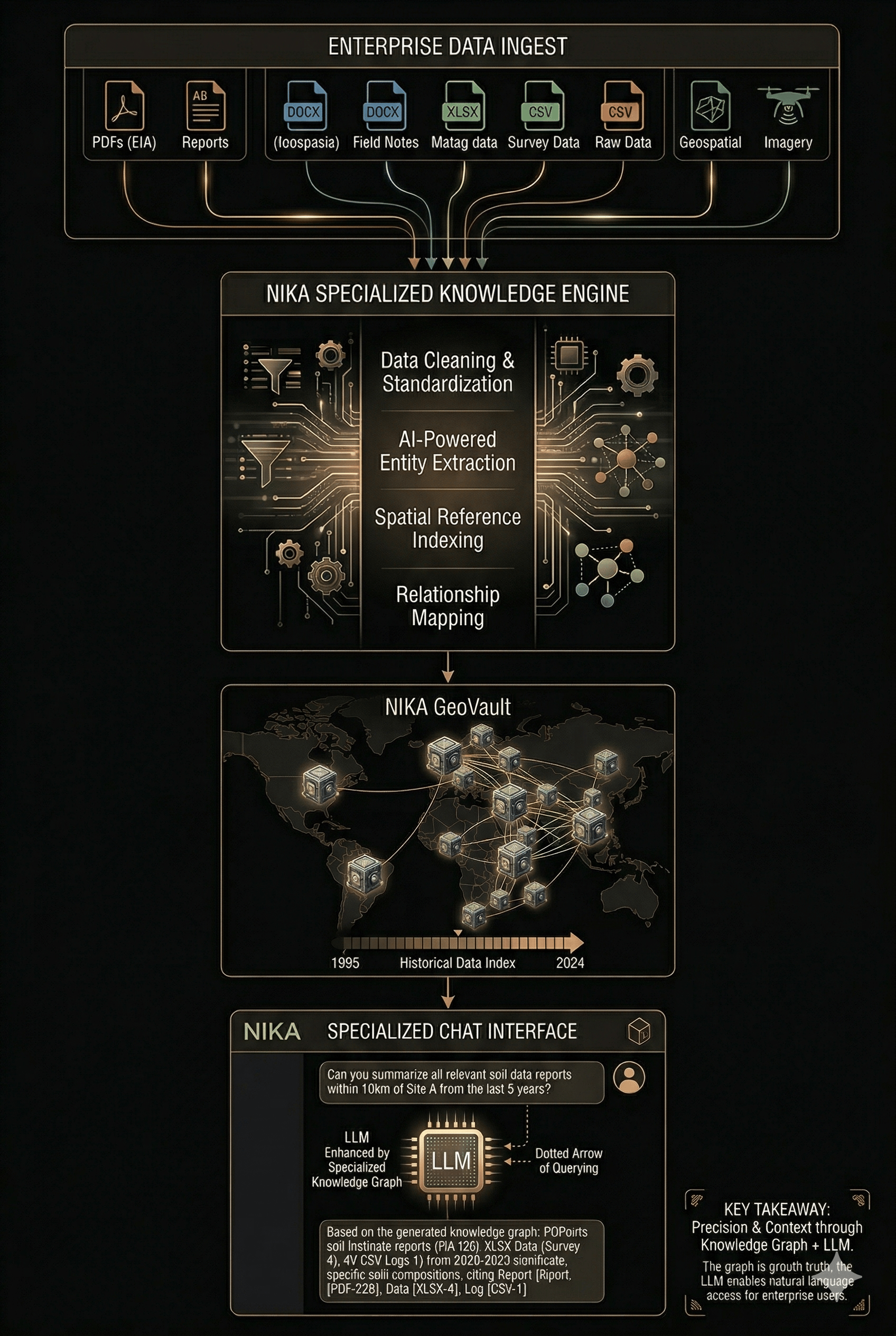
How do I update Memory Core with new documents?
How do I update Memory Core with new documents?
Memory Core learns continuously as your team works. After each session, you’ll see a prompt asking whether you’d like to add that session’s queries and insights to your knowledge base — you stay in full control of what gets retained.You can also manage Memory Core manually at any time, where you can browse all indexed content, add new documents, remove outdated entries, and reorganise your knowledge base as your data evolves.
How can team members access Memory Core?
How can team members access Memory Core?
Memory Core is shared at the organisation level. Any team member with access to your Nika Desktop workspace can open and query the same knowledge base. Permissions are managed through your organisation’s Nika account — administrators can control who can add or delete documents, while read access can be granted more broadly. There is no seat limit on access.
What formats of data does Memory Core support?
What formats of data does Memory Core support?
Memory Core accepts a wide range of geospatial and document formats, including:
- Documents: PDF, DOCX, XLSX, CSV, TXT
- Geospatial vector data: Shapefile (.shp), GeoJSON, KML, GeoPackage (.gpkg), DXF
- Raster data: GeoTIFF, ECW, JPEG2000
- Tabular data with coordinates: CSV or Excel files containing latitude/longitude or easting/northing columns
How does the location-awareness work?
How does the location-awareness work?
When you upload geospatial files or documents that contain spatial references (coordinates, place names, grid references, or embedded geometries), Memory Core extracts and indexes the location metadata. When you ask a spatial question — for example, “show me all site investigations within 500 m of this point” — it uses that location index to filter and rank results geographically. You can also draw an area of interest directly on the map and Memory Core will scope its answers to that extent.
Is data stored in Memory Core secure?
Is data stored in Memory Core secure?
It depends on how you use it:
- Single user (local): Your Memory Core is created and stored entirely on your local machine. No data leaves your desktop — there is no cloud upload, no external server, and no network dependency. Your documents stay where you put them.
- Team sharing (cloud): When you share Memory Core with your team, the data is synced to the cloud. All documents are encrypted at rest using AES-256 and in transit using TLS 1.3. Each organisation’s knowledge base is stored in isolated, organisation-scoped storage — your data is never shared across organisations or used to train any model. You retain full ownership and can delete individual documents or the entire knowledge base at any time, with permanent deletion confirmed within 24 hours.
Try NIKA Memory Core With Your Data
We’ll take a sample of your organization’s existing documents and turn them into a live Memory Core — so you can see exactly what your team would be able to query before committing to anything.Book a NIKA Memory Core Demo
30 minutes — bring your own documents. We’ll handle the rest.