

Overview
NikaFlow is a visual ETL (Extract, Transform, Load) conversion engine designed specifically for geospatial and 3D data formats. Built like FME Flow but optimized for modern cloud workflows, NikaFlow provides an intuitive drag-and-drop interface for creating data transformation pipelines without coding.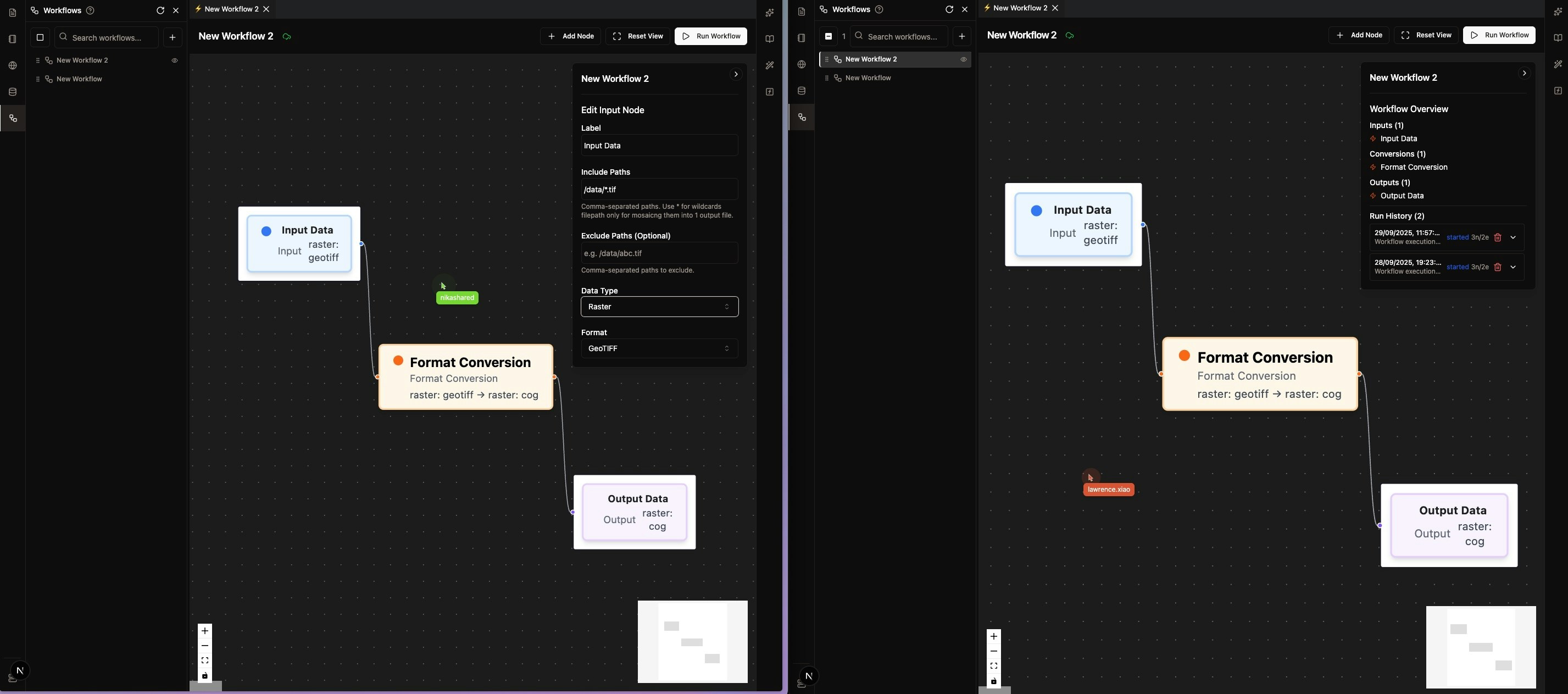
Key Features
Visual Workflow Designer
- Drag Interface: Build ETL workflows visually with no coding required
- Pre-built Transformers: Extensive library of geospatial and 3D transformation tools
- Real-time Preview: See data transformations as you build
- Multi-user Edit: Built and modify together with your team members, nothing missed!
Geospatial Format Support
- Vector Formats: Shapefile, GeoJSON, GeoPackage, KML, KMZ, FlatGeobuf, GeoParquet
- Raster Formats: GeoTIFF, COG, ECW, HFA, JPEG, JPEG2000, CADRG
- 3D Point Cloud: LAS, LAZ, XYZ, PLY, PNTS
- 3D Mesh/Scene: STL, OBJ, DAE, GLB, GLTF, B3DM (to be built)
- 3D Tiled: 3D Tiles, I3S
- Style Formats: LYRX, SLD, QML
Advanced Transformations
- Coordinate System Conversion: CRS detection and transformation options available
- Data Validation: Data visualization directly in Nika Web UI
Data Integration
- NikaWorkspace Data Lake: Direct integration with data already uploaded to NikaWorkspace
Common Use Cases
Data Transformation
- Legacy System Migration: Convert old GIS data formats such as CADRG to modern formats
Data Processing (to be built)
- Coordinate System Conversion: Transform data between different CRS
- Compression: Choose different supported compression algorithm during conversion (lossy or lossless)
- Split/Merge Operations: Use wildcard filename to merge multiple sources into one or use split flag to separate each object from the source
3D Data Processing
- Point Cloud Processing: Convert and process LiDAR data
- 3D Mesh/Scene Conversion: Transform between different 3D model formats (to be built)
- 3D Tiles Generation: Create optimized 3D tile formats for web visualization
Source Trigger Pipeline
- Upload Trigger: Set the source to be a folder, so that every new batch of uploaded files there will be auto converted based on prior configuration (to be built)
Get Expert Help
Talk to a Geospatial Expert
Need help with your geospatial projects? Our team of experts is here to assist you with implementation, best practices, and technical support.
Other ways to get help:
- Guides: Use the /guides tab for detailed tutorials
- Community: Ask questions in our community forum
- Support: Send us a support request