

Overview
NikaWorkspace is our flagship geospatial data lake platform designed for handling petabytes of spatial data with direct AI agent integration. Built for data scientists, analysts, and developers who need powerful tools for large-scale geospatial processing, visualization, and insights.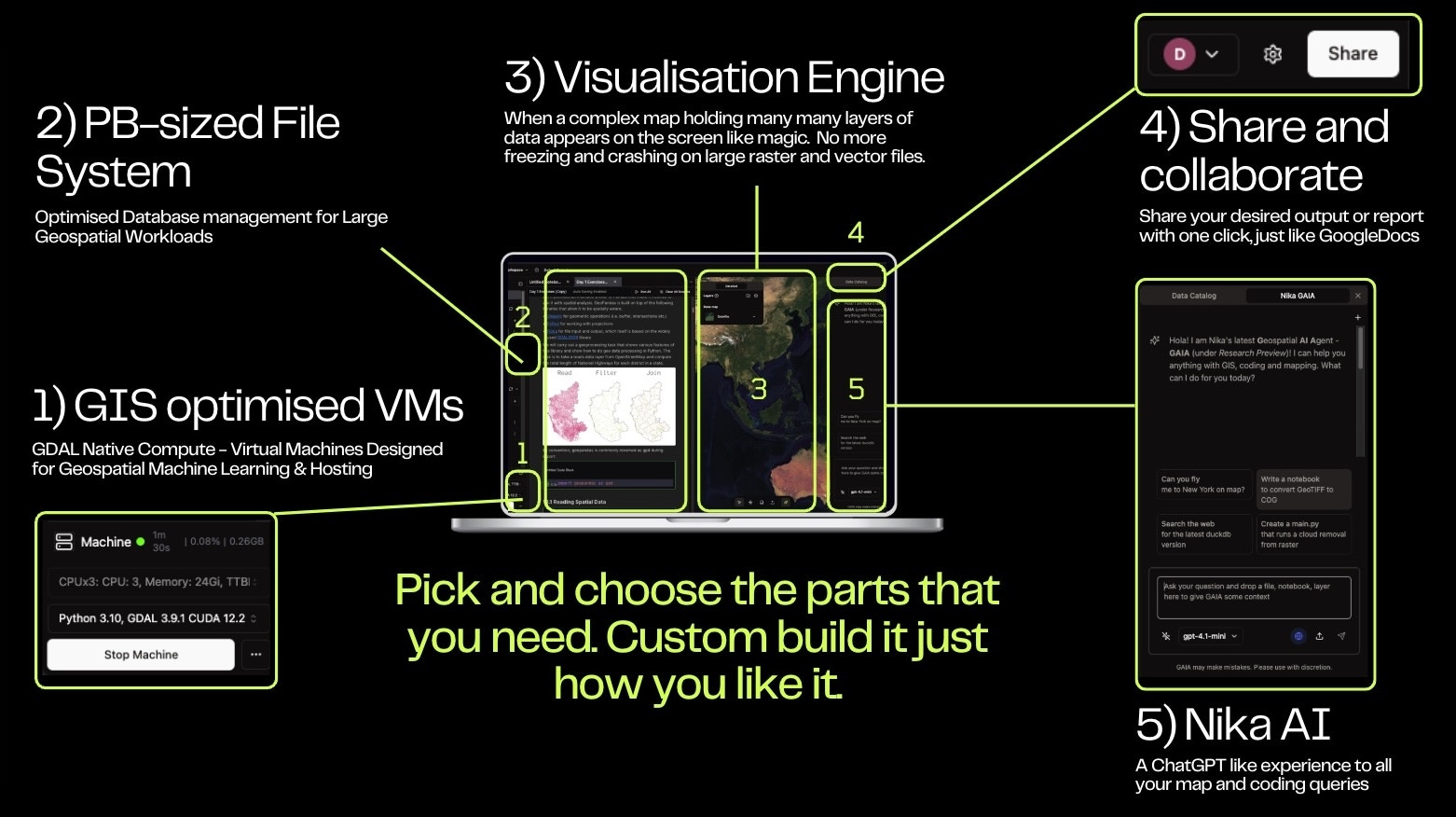
Key Features
Petabyte-Scale Data Processing
- Massive Dataset Support: Handle petabytes of geospatial data efficiently
- Optimized Storage: Advanced database management for large geospatial workloads
- Distributed Computing: Parallel processing across multiple nodes
- Memory Optimization: Intelligent caching and data streaming
AI Agent Integration
- Direct AI Assistance: Seamless integration with Nika’s AI agent for intelligent analysis
- Natural Language Queries: Ask questions about your data in plain English
- Automated Insights: AI-powered pattern recognition and anomaly detection
- Smart Recommendations: Get suggestions for analysis approaches and visualizations
Advanced Geospatial Analysis
- Spatial Operations: Complex spatial analysis and transformations
- Statistical Analysis: Comprehensive statistical modeling for spatial data
- Machine Learning: Built-in ML algorithms for spatial predictions
- Real-time Processing: Live data analysis and streaming capabilities
Key Features
Enterprise-Grade Data lake
- TB-size Storage: Upload TBs of data to NikaWorkspace as your team repository to collaborate on
- Real-time Filesystem: Any changes to the selected folder will be synced in real time between the Web UI and the connected VM
- High Speed Performance:
Data Processing
- NikaNotebook: Import data from CSV, GeoJSON, Shapefiles, and more to Nika’s collaborative python notebook to run analysis on with GDAL pre-installed for you
- NikaDBMS: Perform spatial SQL query with connected database or Nika managed DuckDB instances
Visualization
- NikaMap: Create dynamic, interactive maps with multiple layers
- Web Preview: Double click a file to directly preview in a panel without having to download it to preview else where (more extensions will be supported iteratively)
- NikaDashboard (Preview): Drag your file or database or map to create an interactive dashboard for operation and presentation
AI-Powered Insights
- Pattern Recognition: AI algorithms to identify patterns in spatial data
- Predictive Analytics: Machine learning models for spatial predictions
- Anomaly Detection: Automatic detection of unusual patterns in data
- Recommendation Engine: AI-powered suggestions for data analysis
Getting Started
Basic Usage
Create a new NikaWorkspace is as easy as click the + Create button and choose the team to create under. Each workspace is then a logical separation of project storage, compute and workloads.Data Sources
NikaWorkspace supports a wide variety of data sources:- File Formats: GeoJSON, Shapefile, KML, CSV, Excel and any format you upload directly
- Databases: PostgreSQL/PostGIS, DuckDB, and many other enterprise DBs to come
- Cloud Storage: AWS S3, Google Cloud Storage, Azure Blob
Visualization Options
NikaWorkspace integrates seamlessly with other Nika products:- NikaMap: Create a powerful map that supports both vector, raster and jpeg layers natively
- NikaDashboard: Drag and drop to create Tableau-looking operation dashboards with filters on Charts, Maps in NikaWorkspace directly
- NikaHub: Share and publish the results of your work to your team and others
- NikaStudio: Use current workspace data to quickly build custom map prototypes
- NikaNotebook: Use collaborative Python notebooks for advanced geospatial analysis
- Nika GAIA: Get intelligent suggestions for your analysis
Best Practices
- Data Preparation: Always clean and validate your data before analysis
- Performance: Use appropriate data structures for large datasets
- Visualization: Choose the right visualization type for your data
- Documentation: Document your analysis workflow for reproducibility
- Version Control: Use version control for your analysis scripts
Get Expert Help
Talk to a Geospatial Expert
Need help with your geospatial projects? Our team of experts is here to assist you with implementation, best practices, and technical support.
Other ways to get help:
- Guides: Use the /guides tab for detailed tutorials
- Community: Ask questions in our community forum
- Support: Send us a support request